
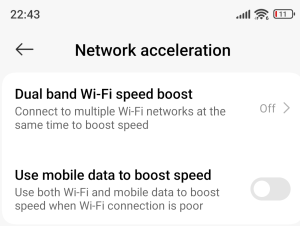
Diagnosing DHCP Conflicts on Xiaomi Devices: The Hidden Impact of Dual Band WiFi Speed Boost
Introduction
In enterprise Wi-Fi environments, even minor misconfigurations or device-specific features can lead to major connectivity issues. This blog post explores a real-world case of DHCP conflicts caused by Xiaomi’s Dual Band WiFi Speed Boost feature, and how it disrupted a network managed by a Cisco Catalyst 9800 Wireless LAN Controller.
Background
The issue emerged in a corporate network where Xiaomi devices were intermittently losing connectivity. Despite having a static MAC address, affected devices would:
- Connect to the SSID and receive a valid IP via DHCP.
- Seconds later, issue a new DHCP request for an unauthorized IP.
- Trigger a DHCP NAK and send ARP probes for the invalid IP.
- CO_CLIENT_DELETE_REASON_EXCLUDE_IP_THEFT: log on the Cisco 9800
This behavior caused network instability and confusion for administrators.
Investigation
Initial diagnostics ruled out:
- MAC randomization: The MAC remained static.
- WLC deauthentication: multiple disassociation events were logged.
- Log error: CO_CLIENT_DELETE_REASON_EXCLUDE_IP_THEFT: log on the Cisco 9800
Despite this, the Xiaomi device continued to request invalid IPs and ignored DHCP NAKs.
Root Cause: Dual Band WiFi Speed Boost
After extensive testing, the culprit was identified: Xiaomi’s Dual Band WiFi Speed Boost. When enabled, this feature:
- Connects to the SSID using one radio (e.g., 5 GHz).
- Obtains a DHCP lease.
- Then connects again using the second radio (e.g., 2.4 GHz), triggering a new DHCP request.
The DHCP server interprets this as a conflict, issues a NAK, and the device sends ARP probes for the invalid IP.
How to Reproduce the Issue
- Enable Dual Band WiFi Speed Boost on a Xiaomi device.
- Connect to a Wi-Fi SSID managed by a Cisco 9800 WLC.
- Observe the initial DHCP assignment (e.g.,
10.30.168.210). - Monitor for a new DHCPREQUEST for an invalid IP (e.g.,
10.30.168.63). - DHCP server responds with a NAK, followed by ARP probes.
Log Snippets
DHCP ACK: Assigned IP address 10.30.168.210 to MAC [static]
DHCPREQUEST for 10.30.168.63
DHCPNAK: Client requested 10.30.168.63 – not in lease pool
ARP Probe: Who has 10.30.168.63? Tell 10.30.168.63
Client Log Evidence
The device logs show two active Wi-Fi interfaces (wlan0 and wlan1) switching rapidly:
ACQ IpReachabilityMonitor.wlan1
REL IpReachabilityMonitor.wlan1
ACQ IpReachabilityMonitor.wlan0
REL IpReachabilityMonitor.wlan0
Resolution
Disabling Dual Band WiFi Speed Boost on the Xiaomi device resolved the issue. The device stopped issuing unauthorized DHCP requests, and network stability was restored.
Broader Implications: Similar Features in Other Devices
Other smartphone vendors “Q2-2025” offer similar Wi-Fi acceleration features that may cause similar issues:
| Vendor | Feature Name | Functionality |
|---|---|---|
| Samsung | Intelligent Wi-Fi / Wi-Fi+ | Uses both bands for stability and speed |
| Huawei / Honor | Wi-Fi+ / Link Turbo | Combines Wi-Fi and mobile data |
| OnePlus / Oppo / Realme | Smart Network Acceleration | Dual Wi-Fi or band aggregation |
| Vivo / iQOO | Dual Wi-Fi Acceleration | Uses both radios to reduce latency |
Conclusion
This case underscores the importance of understanding client-side features that may interfere with standard network protocols. While features like Dual Band WiFi Speed Boost aim to enhance performance, they can inadvertently disrupt enterprise networks.